Fotak
★ The next 2,500 users get 2 months of Premium free — use code FOTAK95 — hurry before you miss out →
Fotak

A date stamp with real film in its blood

Some dates
deserve to glow.

Fotak brings back the date stamp your old film camera burned into the corner of every photo — the one that turned a snapshot into a moment you could place in time.
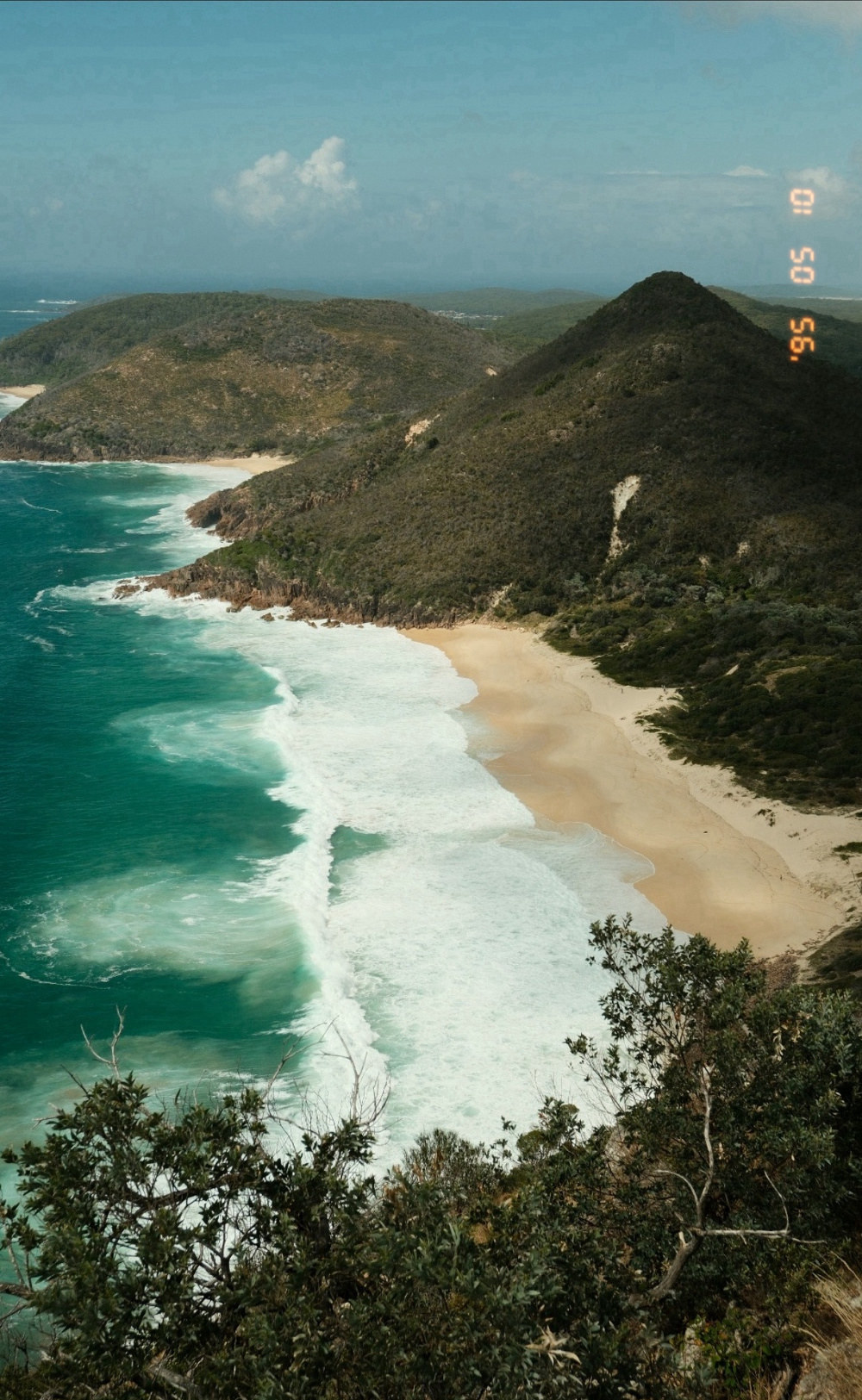
A coastal photo stamped by Fotak
Retro

every style here is a real render, straight out of the app

Not printed. Burned in.

Most apps print a date.
Fotak exposes one.

A real date-back didn’t lay ink on your photo. It fired a tiny lamp at the film, exposing the date into the frame — so it fell away on a pale sky and blazed on a dark one. Fotak behaves the same way. Both halves below are the same stamp, same settings, same render.


The date stamp on a light background, barely visible
The same date stamp on a dark background, glowing
On light On dark
↔

one stamp — two backgrounds — nothing faked in between

Nothing invented

The date was already in there.

Every photo on your phone quietly carries the moment it was taken. Fotak doesn’t ask you to type it, guess it, or make it up — it reads the real capture date out of the file and puts it back where you can see it.

Stamp one photo or a whole trip at once. The originals are never touched; every stamped shot is saved as a new copy in its own album.

File
IMG_0413.HEIC
Date taken
10 May 1995, 4:12 pm
Camera
Rear wide
Read by
Fotak, on your device
'95 05 10

rendered in the app’s own typeface

No account. No upload. No internet connection required — your photos never leave your phone.

Six ways to remember

One date, six different decades.

Every style is its own hand-tuned recipe — its own typeface, its own glow, its own colour. Pick one to see it land on a real photo.

tap any style above to put it on the photo

A photo stamped in the selected style

Retro The warm orange glow of a late-80s point-and-shoot. Soft-edged and generous with its light — the one most people picture first.

Thirteen rolls, one camera

Pick a stock. Watch the light change.

Each one is a full colour recipe — its own white balance, its own contrast, its own grain — tuned to behave the way a real roll of film once did. Tap a canister to load it onto the photo below.

tap any canister above to load it

A photo rendered in the selected film stock

Standard Your photo's own natural colour.

Make it yours

Tune it once. Save it forever.

Nudge any look’s grain, colour and tone until it’s exactly right, then save it as your own Custom Stock — it sits right alongside the built-in 13, ready for the next photo. This is the real save screen, not a mock-up.

Name this stock

Custom stocks

No custom stocks saved yet

Free keeps your first save forever — Premium saves as many as you like.

Borrowed from real glass

The glow a mist filter gives you, dialled in.

Photographers pay for a black mist filter or a glow-glass lens for exactly this: bright edges bleeding softly into what’s around them. Fotak calls it Halation — a real slider inside Film Stock, with Strength, Threshold and Spread all yours to set. Off by default. Drag to see it land.


The photo with Halation off
The same photo with Halation turned up
Off On
↔

same photo, same look — only Halation moved

Obsessive by design

Drawn, not downloaded.

The details nobody would notice are the reason it feels right.

'95

Custom-drawn typefaces

Every digit was redrawn from scratch for this app — segment angles, notch softness, the pointed film-year apostrophe. Not a free font with a glow filter on top.

年 月 日

Real Japanese spacing

Tokyo 昭和 sets its date the way vintage Japanese date-backs actually did: a breath after the year, none between month and day. The kanji carry the grouping, so nothing is padded out.

05 10

Tuned per style, by eye

Months of slow, patient work: each style set side by side with real film photographs, adjusted, compared, adjusted again — until it simply looked right. Then locked in for good.

Fotak

Add the date.
Keep the moment.

Free to start. Works completely offline.

Available on Android & iOS

Support

Fotak, by Camps Studio

Start with the common questions below. If none of them cover it, email us and a real person will read it.

The date on my photo looks wrong, or is missing

Fotak reads the real capture date straight from each photo’s own metadata. If a photo has passed through a messaging app (WhatsApp, Messenger and the like) or certain cloud services first, that app often re-encodes the photo and strips the metadata out — so Fotak falls back to the file’s creation date, which can be the day you received it rather than the day it was taken.

To keep a photo’s original date intact when moving it between your own devices, use AirDrop, email, Google Drive or OneDrive rather than a messaging app.

Where do my stamped photos go?

Every stamped photo is saved as a new copy in its own “Fotak” album in your photo library. Your original, unstamped photos are never modified or deleted.

Can I change the stamp’s style or position for one photo?

Yes. Open Preview & Adjust on your selected photos — the stamp style, its position and its date can all be set individually per photo, not just for the whole batch at once.

Why is the date faint on some photos?

That’s the effect working as intended. A real date-back exposed light into the film rather than printing ink on top, so the date always sat fainter on pale backgrounds and glowed on dark ones. Fotak reproduces that behaviour rather than pasting a flat graphic over your photo.

Something else went wrong, or a photo failed to stamp

Email hello@fotak.app with a short description of what happened, and a screenshot if you have one.

Privacy Policy

Last updated 3 November 2026

In short: Fotak doesn’t collect, store or transmit any of your data anywhere. It works entirely on your device, with no internet connection, no account and no analytics.

What Fotak does

Fotak adds a date stamp to photos you choose from your own photo library, using the date the photo was actually taken, and saves the result back to your photo library. All of this processing happens locally on your device.

What Fotak accesses

Fotak asks for permission to access your photo library so it can:

  • Show you the photos you have to choose from
  • Read each photo’s date (and, where the original metadata is available, technical details like resolution) to place the stamp correctly
  • Save the finished, stamped photo back to your library

Fotak does not read, use or store your photos’ location data, even where it happens to be present in a photo’s metadata.

What Fotak does not do

  • It has no internet access and cannot send anything anywhere. There are no servers involved at any point.
  • It does not collect analytics, crash reports, advertising identifiers or any other usage data.
  • It does not show ads.
  • It does not require or offer account creation or sign-in.
  • It does not share, sell or otherwise disclose any information to any third party, because none is ever collected in the first place.

Data stored on your device

Fotak remembers a small amount of your own preferences (such as your chosen date-stamp style) directly on your device, using standard app storage. This never leaves your device and is deleted if you uninstall the app.

Children’s privacy

Fotak is a general-purpose photo utility, not directed at children, and does not knowingly collect information from anyone of any age — it doesn’t collect information at all.

Changes to this policy

If this policy ever changes — for example, if a future update adds a purchase option — this page will be updated and the “last updated” date above will change accordingly.

Contact

Questions about this policy, or anything else about Fotak, can be sent to hello@fotak.app.